
If a genie came out of a bottle and granted us three wishes... you're about to see what we would pick, because this was the first quarter we got to enjoy the 3x speedup happening in modern development tools. If there was something that you didn't like about Amplenote before, check out what our genie has been up to?
About half of the work we undertook sprung from ideas contributed by our productivity-minded customer base. Specifically, the #1 voted (S-pen support for Android), #3 voted (multiple windows for desktop app), and #5 voted (reorder shortcuts) features? ✅, ✅, and ✅. What's more?
Many of our wishes involved a more perfect iPad app, and the fruits of that intent are evidenced with every recent iOS release – especially the one dropping this week. The upcoming release is where you'll find the "menu accessibility," "mobile settings for Task Domains," and "mobile plugin install/config" variously mentioned below.
The other major push has been to help users formulate their quarterly plan, and to help the tasks implicated in that plan percolate into the agenda. You'll find this embodied in Plan Builder & Suggested Calendar Tasks.
This post covers most of what we've shipped since the Q2 roundup. As always, the full, unfiltered list of every merge is public in our product changelog.
linkHeadlining Features
Too many to count. We'll try to keep it brief.
link✍️ Handwriting for S-Pen & Android (#1 Voted Feature)
Suggested in 2022, and having accumulated 18 votes + 14 comments, several of which had reached the "is this still being considered?" stage. 😬 Four years later: the Android S-Pen now works the same way the Apple Pencil does on iPad.
Pick up the stylus and draw. Sketch a diagram in the middle of a meeting note, annotate a screenshot you pasted, or write a few lines longhand because your thumbs are tired of the keyboard. What you draw stays editable.
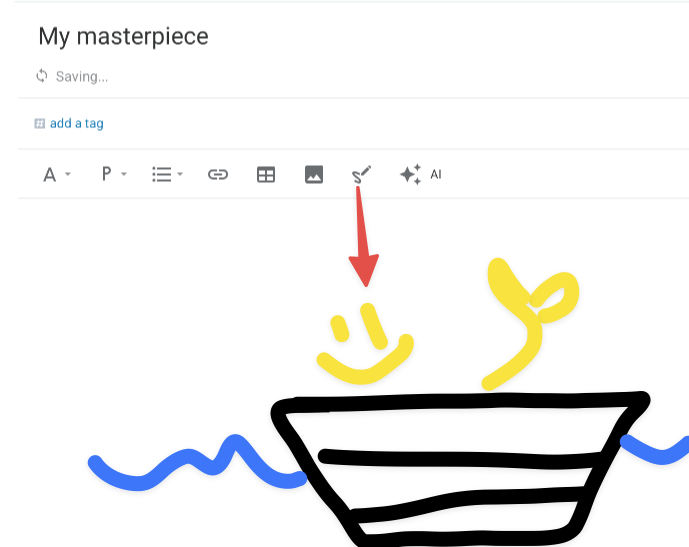
Your wish is our command
If you voted for this one, thank you for your patience.
link📱 Classic Calendar Drag on iPad (+ Phones in Landscape)
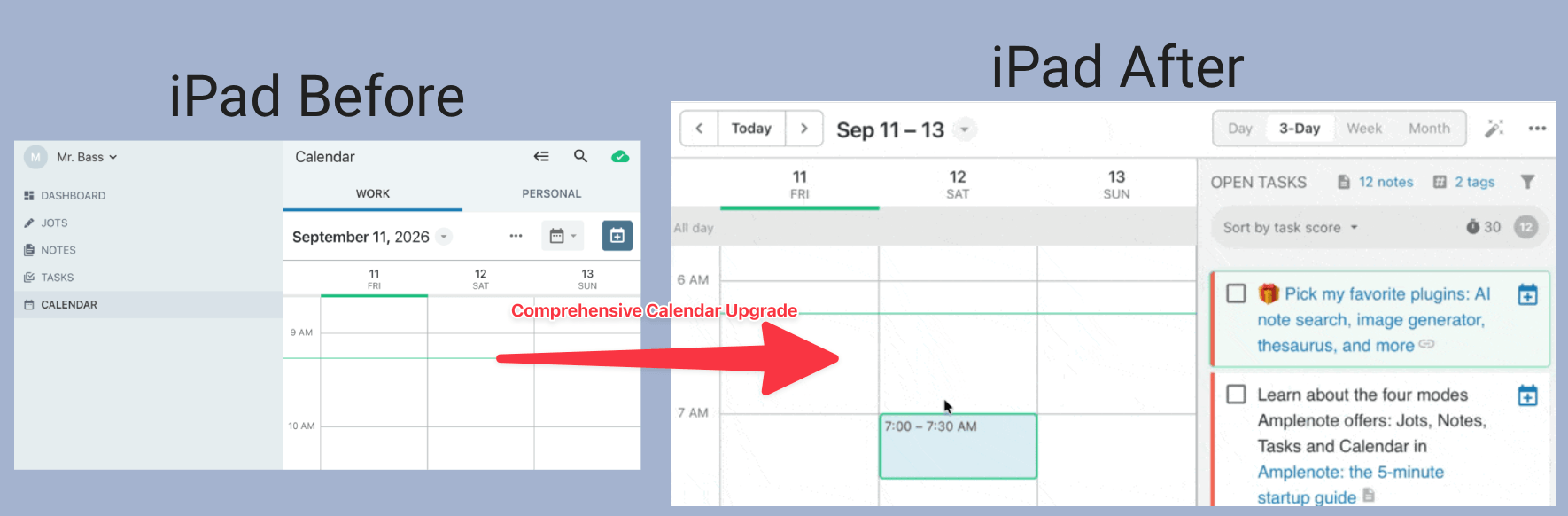
Five years after it debuted on the roadmap: tap the calendar icon, drag a task, it's on the schedule. The canonical Amplenote "Idea Execution Funnel" action is finally available for iPad – and even phones rotated to landscape. 🚀
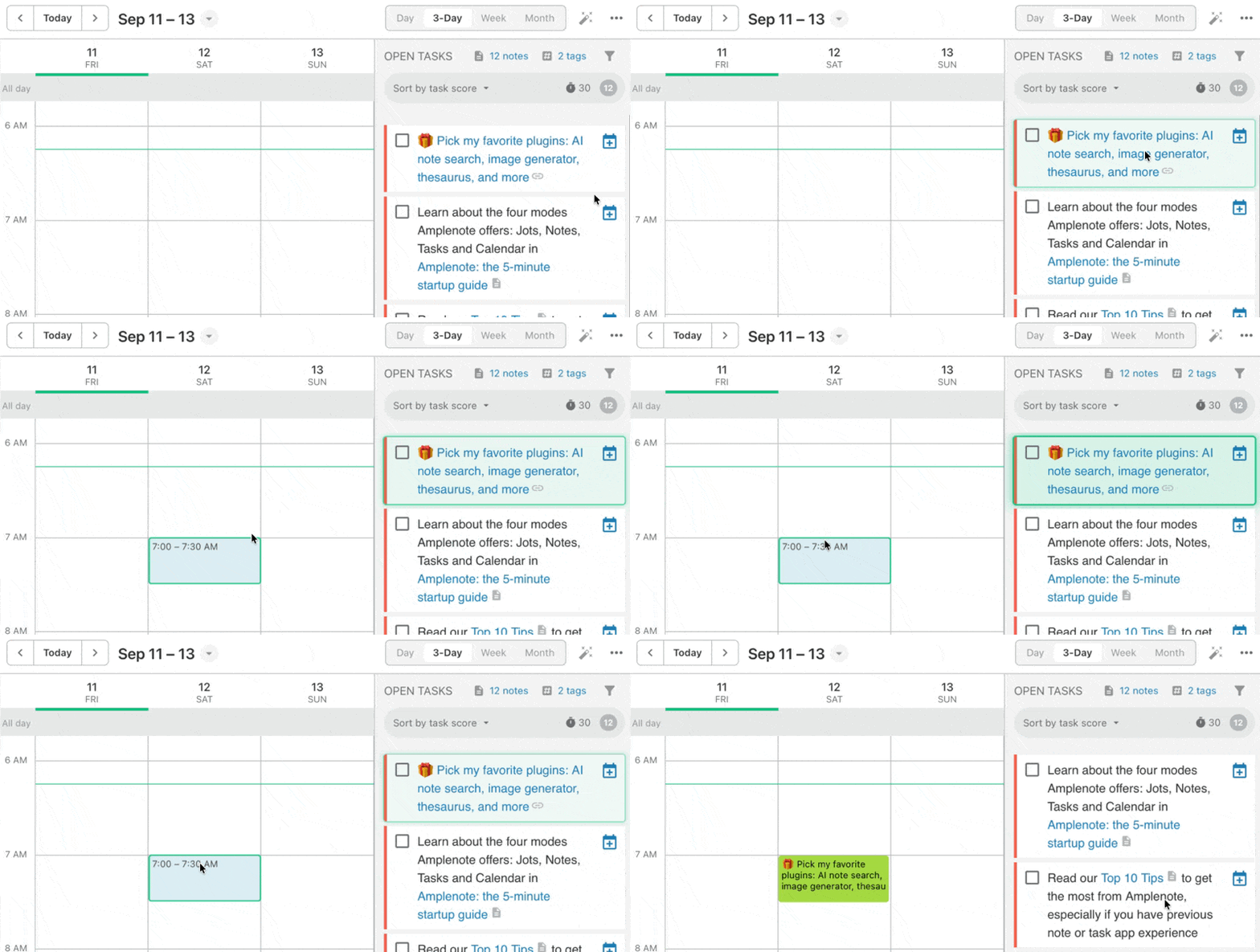
The iPad calendar's top bar also got a proper refresh. On wider screens, date navigation and the view-mode selector are now inline instead of buried, with a segmented control replacing the old secondary-action button.
link🖼️ Dedicated Note Editor Windows (#3 Voted Request)
"Make multiple windows easier in Mac Desktop App" has been sitting on the board since July 2024 with 14 votes, making it the third-most-voted open request. It's done.
In the desktop app, shift-click a note — or right-click it in the notes list and pick the option — to open it in its own window. Reference one note while writing in another, park your daily jot on a second monitor, or keep a project note open while you dig through everything else.
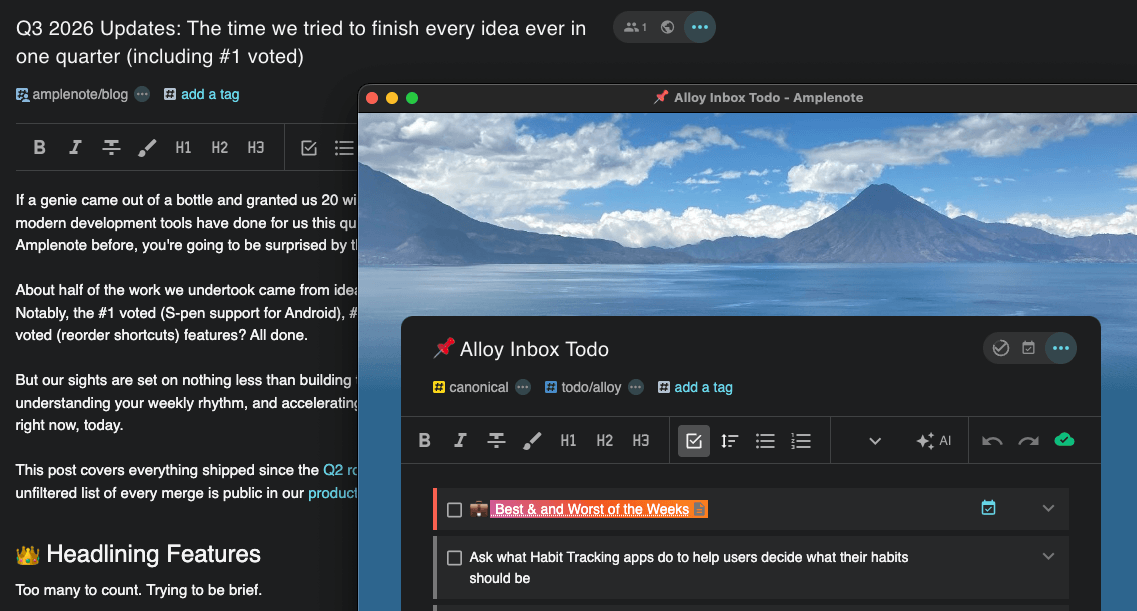
Secondary windows can be opened to multiply optionality
Alongside it, the desktop app now handles amplenote://app/... deep links in-app, whether the link came from inside Amplenote or from another application entirely. Link to a specific note from your terminal, your calendar, or a script, and it opens where you'd expect instead of bouncing through a browser.
link🧙♂️ Suggested Tasks on Calendar
A new perk for those who have filled out their Quarterly Goals in the Dashboard with an AI API key available (through Agent Pro subscription, or adding your own to Dashboard)...
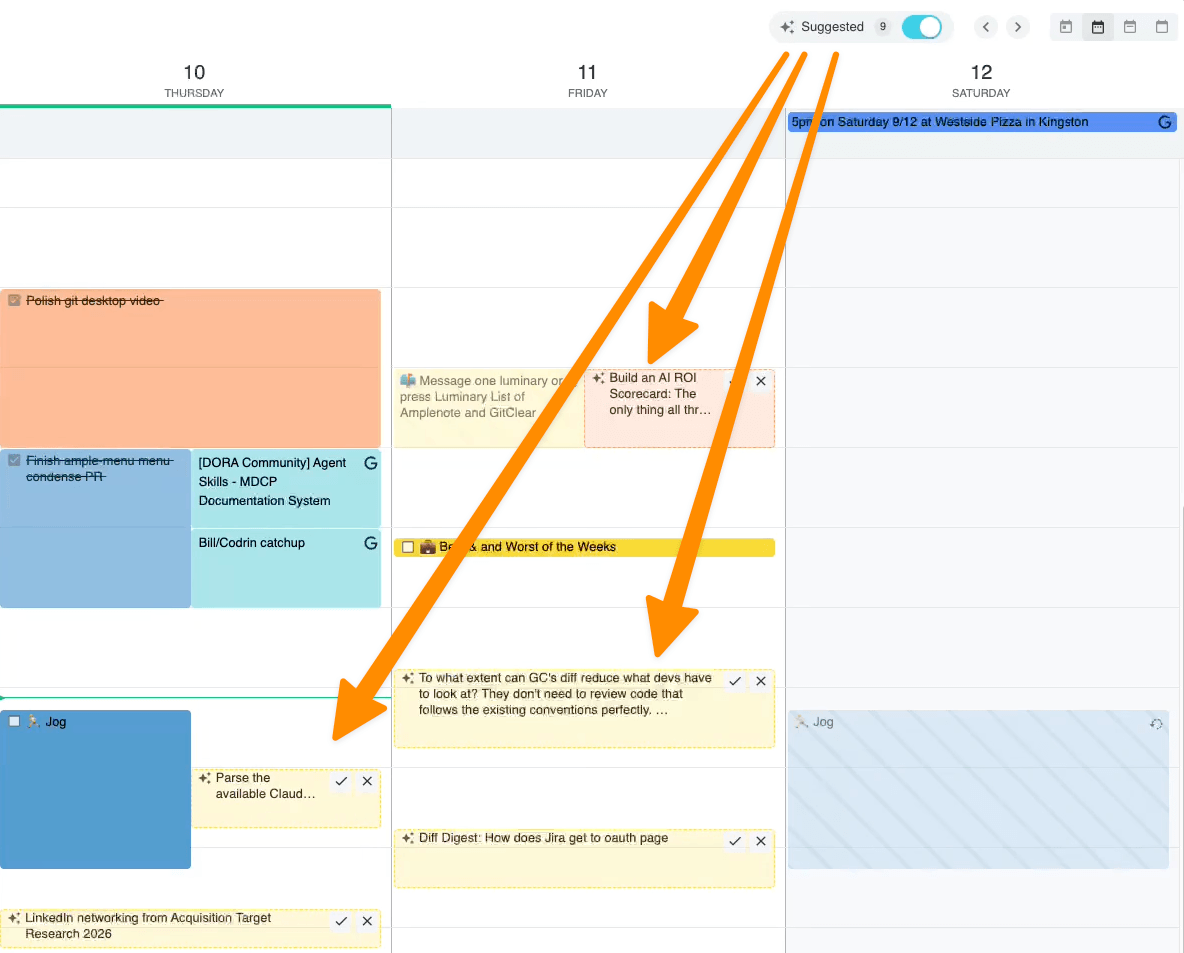
While this feature is still in its early stages of development (along with its counterpart, the Dashboard's Plan Builder) but we will be dogfooding this one daily, so expect to see rapid improvements as the year enters its home stretch.
If you are not seeing the "Suggested" label of the ✨ icon on your calendar, ensure that you have Dashboard Quarterly Goals setup, and an LLM connected (Suggested Tasks help page).
link🗜️ Mobile menu accessibility
Changing menus as a headliner? In this case, yes, because the previous version of Amplenote mobile made it rather difficult for users to discover how many powerful options were available to them in any given context.
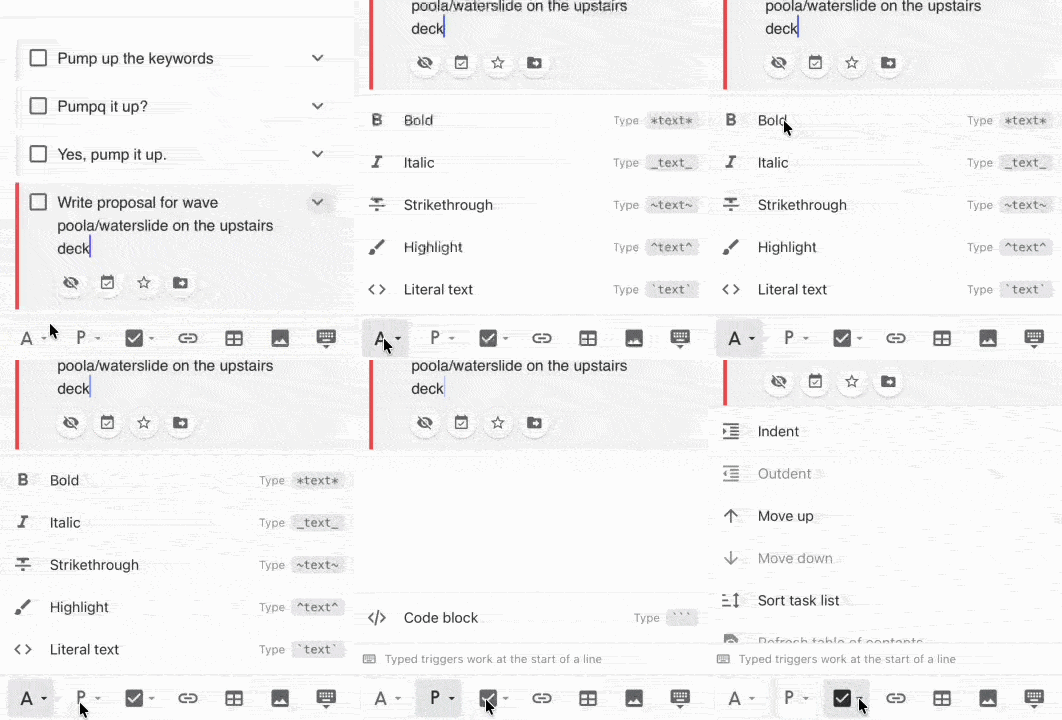
When users next upgrade their mobile app, they'll find they now have much quick access to all of the formatting and transformation options that have long been enjoyed by our desktop users.
linkBig Upgrades & New Releases
Not quite huge, but pretty darn big.
link⚙️ Accommodating the Mobile-Only Use Case w/ Settings Upgrades
Two of Amplenote's best features are its instant external calendar sync and its large plugin ecosystem. Unfortunately, before now, getting access to these key features required logging in to the web app. For the numerous users who discover Amplenote on the App or Play Store, that means that our best features were effectively gated off. No longer.
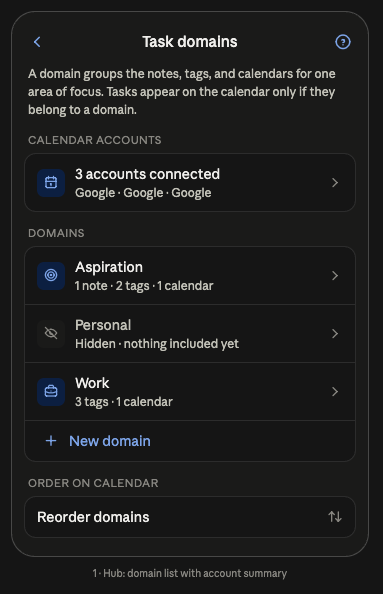
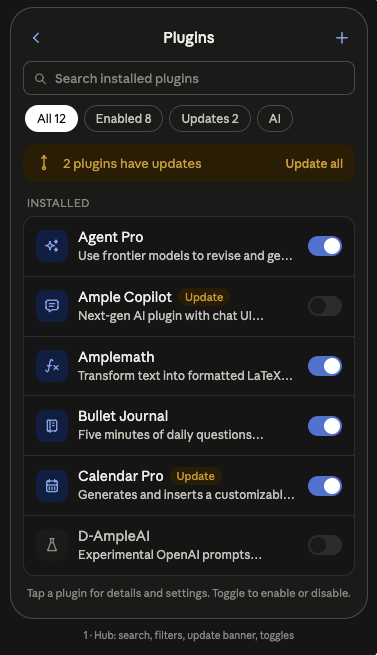
These prototype designs are on track to be released on the week of September 14th, i.e., the week you are reading this.
If you're a mobile-first user who has been waffling on whether to tap into the plugin ecosystem or calendar syncing, tune in to the Amplenote update stream? 🙏
link🏷️ Tag Filters Learn to Say "OR"
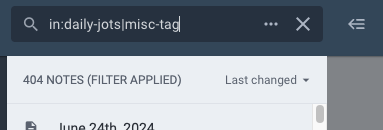
Throughout the app, tag filters now accept the vertical pipe character as an OR operator. It binds looser than the comma, so a filter written as:
... means notes with both tag-a and tag-b, or notes with both tag-1 and tag-2. If you've been maintaining two saved searches (e.g., for "todo" and "daily-jots" tag) because you couldn't express one idea in one filter, you can probably collapse them now.
And fortunately, with this quarter's updates, any Shortcut can be renamed and reordered.
link🖥️ Dashboard: Note Peek, Widget Focus, and Plan Builder
The Mission Control Dashboard picked up a big ole batch of upgrades this quarter:
Note Peek. A new component that shows the contents of a selected note without leaving the Dashboard.
Expand-on-click widget focus, on desktop. Widgets now expand and animate into focus when you click their upper-left icon, instead of the old jump-cut.
Proposed Agenda got situational awareness. A new day-recommendation context module looks at all-day events and at which projects you've historically worked on which days of the week (e.g., you always do invoicing on Thursdays).
Quarterly plans and proposed actions are now task-domain specific. Recommendations are scoped to the right domain rather than blending your whole life into one list.
Goal Coach stopped repeating itself. It was occasionally recommending tasks you'd already completed, or the same task twice. Both fixed.
Swap background. A new quick action cross-fades to a different splash image, with the incoming image preloaded so you don't get a blank frame. Session-only, so your real preference survives.
All of which is fine and nice, but the real attention this quarter went in to v1 of Plan Builder:
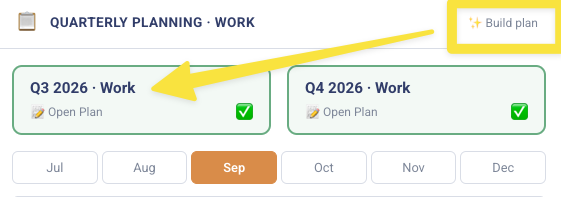
From humble beginnings emerges your new life-maker
This blog is already too long to detail our hopes and dreams for building a quarterly plan. Suffice to say, the experts have convinced us that picking a quarterly and monthly goal is instrumental to getting the right tasks done. Historically, it has been a huge willpower drain to figure out what's most important this quarter, but we aspire to craft Plan Builder into a satisfying companion to curate the ideal quarter.
link⏱️ Scheduling Precision: Duration, Repeat, and Scope
Creating a task has always been fast. Saying how long it takes and when it comes back meant a second trip. Two changes closed that gap this quarter.
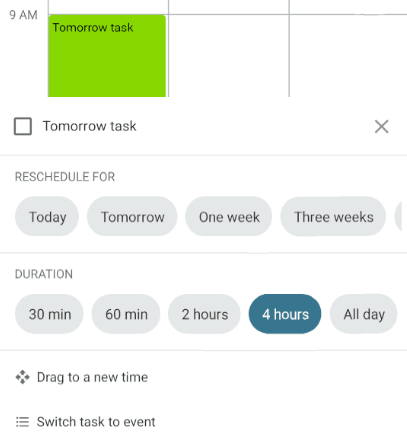
From the calendar. Click a task or event on the calendar and you'll now get duration options right in the menu — 30m, 60m, 2h, 4h, or All day. No detour into the task detail view.
From the Quick Task Bar, the "Task Options" now includes a "Duration" link to label your incoming tasks if you're the overachieving sort.
link⏫ Sortable Shortcuts (#5 voted)
For some time now, you've been wishing that you could sort the order of the shortcuts you create in the left pane. Now, when you click and drag a shortcut you have created (and optionally renamed) on web and desktop.
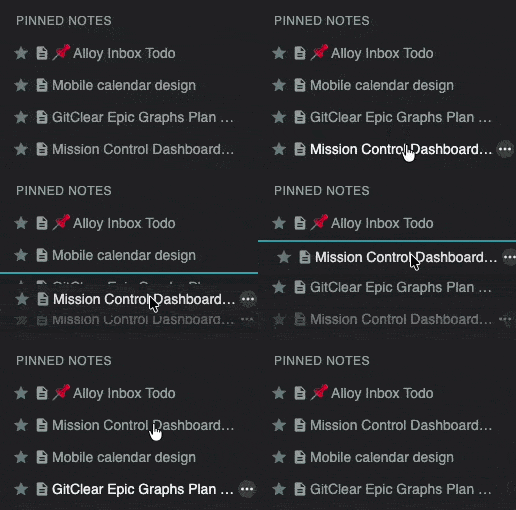
Pinned notes are sortable too
The order of your Shortcuts (or Pinned Notes) is persisted across all platforms.
link🔃 Quick Mobile Task Adder Accepts Weekday/Weekend Recurrence
The Additional Options popup expanded to cover the stuff that defines how a task interacts with your schedule: duration, fixed repeat, flexible repeat (plus day scope), plus mark Important or Urgent.
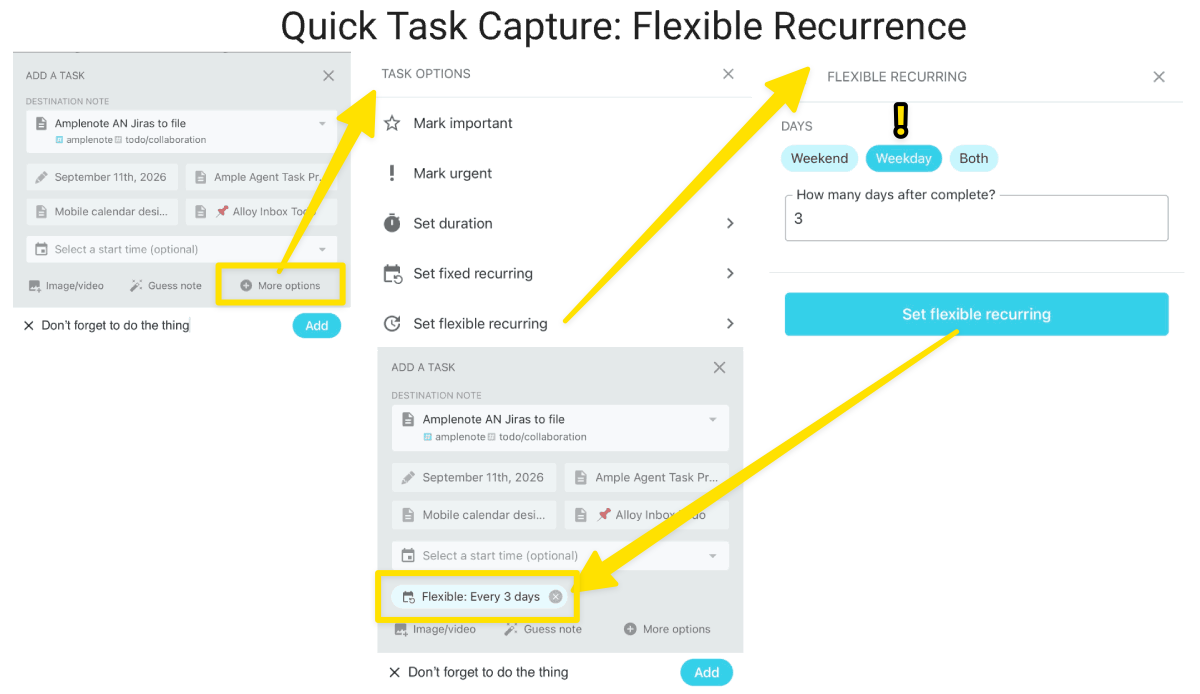
We ❤️ setting recurrence for "weekday" vs "weekend"
Combined with the new and improved "Guess note" button, it's got some pretty utilitarian features you'll not find elsewhere.
link👥 Filter Notes by Who You Shared Them With
Two new filter groups — "Notes shared with me by a user" and "Notes I shared with a user" — let you pick a person and see only what passed between you. Useful when a collaborator says "the thing I sent you last month" and you have four hundred notes.
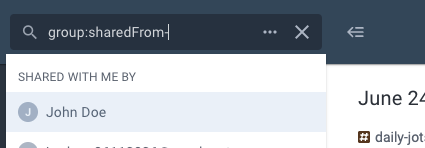
New option to see shared notes
The other new option is in Dashboard, where the Shared Notes component in there will show you the most recently changed notes among those you share with your collaborators.
link🙂 The State of Mind Pane (nee Moods)
On web and desktop, click "Show more" on the State of Mind rating popup to see (and edit) your recent ratings. Victory Value has been quietly asking how you felt for a while now; this is the first place you can look back at the answers and correct the day you initially misjudged.
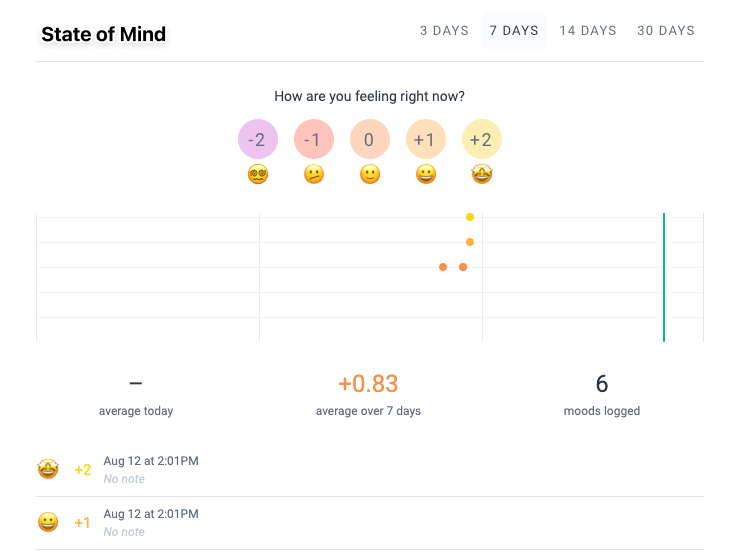
Browse through previous ratings for daily vibe
link🔍 Quick Open Becomes Word Order-Independent
Quick Open now matches note names whose words appear in a different order than you typed them, via an unordered word-wise fuzzy fallback. Search "review quarterly" and find "Quarterly Review."
The underlying fuzzy matcher got a broader tune-up in the same pass: tags are split into words and matched exactly, a partial title word counts only when the remaining query words match tags, piecemeal-match rules are tighter, and when several notes tie it prefers the most recently changed note that actually has tasks in it. Match highlighting was refined to match.
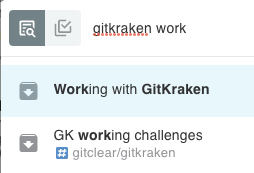
Relatedly, the Guess button in the Add Task popup — the note guesser that picks which note a new task belongs in — is now visible instead of hiding behind a second click.
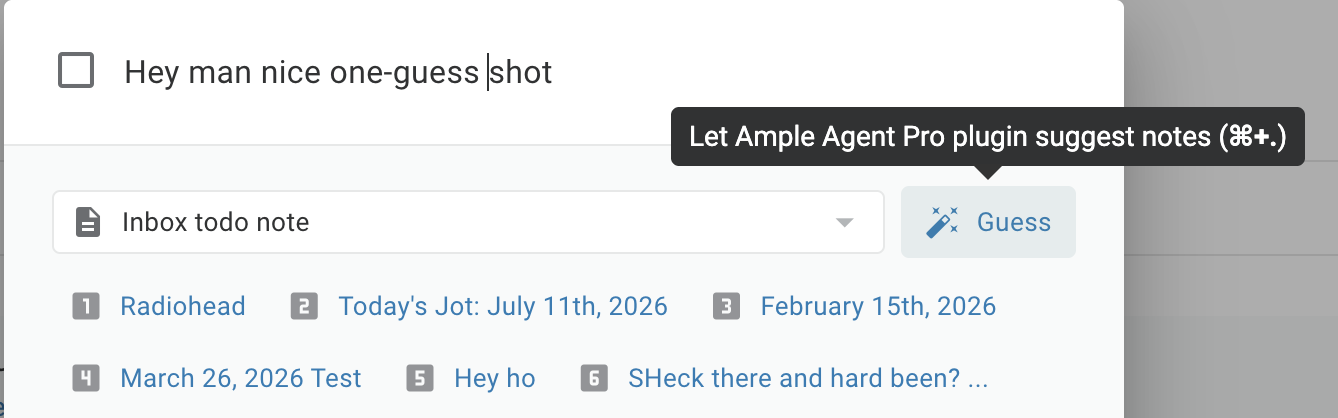
It also was upgraded to use the latest version of its underlying model – we often observe it returning its suggestions in under 2 seconds now. If you're still typing in which note your task belongs in, you're doing it wrong. 😉
link📲 The Mobile Tasks Screen, Reconsidered
The old mobile tasks screen had a standalone open/completed toggle row taking up permanent space, and tag filtering that was technically available but invisible. Both got fixed in one pass: the toggle is consolidated into the title, and the title itself is now a tappable control that opens tag selection.
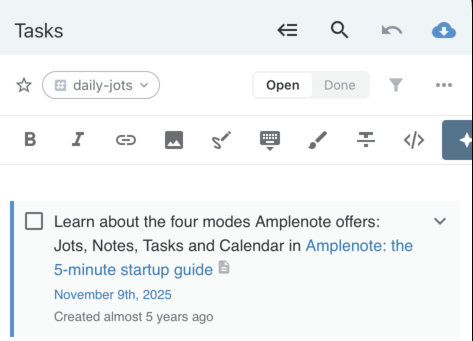
An empty tasks screen also stopped being a blank rectangle. It now tells you why it's empty — whether you're looking at open or completed tasks, and which tag filters are currently active. This is meaningful progress on "Save Open/Closed View and Group By/Sort with Starred Filters for Tasks" (4 votes), though the saved-filter half of that request is still open.
link🔎 More Good Stuff
Editing & content
Batch /move for bullets and tasks. Select multiple list items and move them all at once, including mixed selections of bullets and tasks. Fixed an undo bug in the same pass.
Better multi-item dragging. The preview when dragging multiple list items is clearer, and dragging the first item of a multi-selection no longer drags only that item.
Note Agent (available from the AI button on menu) now attempts to make a one-shot note update when given a straightforward instructions, instead of always creating a research note. Its research note approach is also updated to apply extra pressure to conclude in about a minute.
Previous versions of a note can be restored with one click. Before this quarter, you could only create a new note from your past note versions. Now, you can replace the existing note if you prefer.
Re-dragging a selected item works. After dropping a list item, you can pick it back up without having to deselect it first.
Rich Footnote popups in backlinks. Content in backlinks now gets the same hover-preview treatment as content anywhere else.
Image optimization. Embedded note images can now be run through a Tinify shrink pass that replaces the image in place and tells you how many bytes and what percent you saved when Agent Pro is installed.
Cleaner Complete output. Response text normalization and paragraph-break handling were reworked, so AI completions come back with consistent formatting instead of the occasional wall of text.
Fixes & housekeeping
Removed the distracting styling from the AI button for non-Agent users
Refreshed list of available models in Agent Pro to include the torrent of new versions from every company
Add GLM (Z corp) to the list of AI providers supported by Agent Pro
Mobile toolbar now presents all plugin menu options in a pop-up visible list, instead of a horizontal scrolling bar.
Dragging a task onto a note no longer bumps that note's last-opened time, so your recents list stops filling up with notes you didn't actually read.
Ample Agent's NoteAgent picked up a stop link, matching the Deep Research agent — you can now interrupt a run that's heading somewhere unhelpful.
The Suggested Features board now defaults to a "Hottest" sort, so a good new idea has a shot at momentum instead of being buried under a decade of accumulated votes. This one's for Improve supporter voting (6 votes), alongside last quarter's clearer display of how many votes you have available.
link📹 Dashboard Demo
If you haven't gotten to try the Dashboard yet, here is a 5 min look at why you might want to try:
This predates Plan Builder, we'll get to that in a future video.
link🔮 What's Next?
Nothing. That's it, enjoy. 👋
Er, actually, maybe a few things still possible...
At a high level, we foresee our effort being spread between 3.5 areas:
Servicing the new & improved Suggested Features voting board
Polishing mobile, especially iPad, to have all the same functionality we've packed into desktop
Enhancing Suggested Tasks with an optimized Plan Builder, feedback from users, & misc progress
Elsewhere on the voting board, the requests we hear loudest and are contemplating how to deliver include: populating an account from a directory of markdown files (15 votes), editable inline backlinks (14), reorderable shortcuts (12), and Internet/ICS calendars (11).
Votes recharge as features ship, so if you've been sitting on a full ballot, this is a good week to spend it. And if the thing you want isn't on the board at all — suggest it. The S-Pen request took four years and the iPad drag took five, but by golly we got there!

Wow!!! This is incredible! Ngl, before I opened this update up, I was planning to come in here complaining about how you never responded to my email about AI Search/never seemingly worked on improving it, and how you still haven't made fulltext search for languages like Japanese a thing on web...but then you lead with my #1 suggestion (s-pen)!! I check the changelog frequently, and I never saw it in there - were you keeping that one a surprise?? Thank you SO MUCH.
I just tested it on my Android tablet, and...it works! Only thing is...I can't figure out how to adjust the pen (width/brush/color) for Amplenote, and the default thickness is too thick for my liking for writing notes. 😕 My S-pen settings only seem to work in the Samsung note app or w/e, and won't carry over to Amplenote...it could just be my device (Galaxy Tab Active Pro), but not sure...but at least it's finally usable, unlike trying to write with Excalidraw 🙌
Anyway, I also really appreciate the OR operator for tags (thanks for the usage example, since I wasn't sure whether a space around the pipe was allowed, or if I had to use in: multiple times or if OR also worked). Lets me add a great new shortcut for auditing how I tag notes. Sortable Shortcuts is also a fantastic QOL feature.
Thank you as well for noticing "populating an account from a directory of markdown files" and putting it and editable transclusions/inline backlinks on your radar - I had honestly lost all hope that you'd consider those (altho tbh I'd lost even more hope for the S-pen) 🙌
**THAT SAID** - I'm not a big fan of the mobile "accessibility" changes you're showing here - it looks to me like they'll hide the text you're trying to edit/its surroundings. That can make it hard to know, e.g., how far up/down I want to move a task/bullet (since, for me, that often depends on its position relative to adjacent blocks). Maybe it's okay for some other things (and it's great if it includes more options that previously were unavailable on mobile), but I'd specifically want the ↑ (up) and ↓ (down) arrows to be available without having to expand a menu upward 🙏